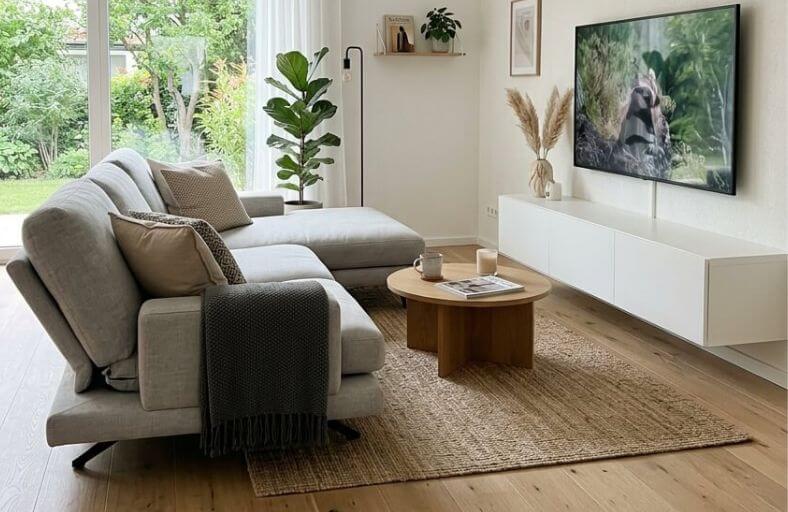
A brand-new 75-inch OLED sits proudly on the wall, but instead of cinematic bliss, every movie night ends with a squint and a stiff neck.
This common frustration usually stems from a simple mathematical mismatch between the sofa and the screen.
Finding the perfect distance is a science that balances pixel density with the natural field of vision. When a couch sits too far, the crisp 4K detail vanishes into a blurry mess.
Too close, and the individual pixels become a distracting grid. Achieving that sweet spot ensures every frame feels lifelike and comfortable for hours of viewing.
The 4K Resolution Sweet Spot
Modern 4K Ultra HD televisions have changed the rules of room layout. Because these screens pack over 8 million pixels into the panel, you can sit much closer than you could with older technology without seeing the screen door effect.
The current industry gold standard for an immersive, cinema-like experience is the 1.2 multiplier.
To find your ideal distance, simply multiply your diagonal screen size by 1.2. For a 65-inch television, this calculation suggests a viewing distance of approximately 6.5 feet.
At this range, the screen fills about 40 degrees of your field of vision, which is the recommended threshold for total immersion.
This proximity allows your eyes to resolve the fine details that make 4K content worth the investment while keeping the action within your central vision.
| TV Size (Diagonal) | 4K Viewing Distance (Feet) | Experience Type |
| 55 inches | 5.5 feet | Immersive (Cinema) |
| 65 inches | 6.5 feet | Immersive (Cinema) |
| 75 inches | 7.5 feet | Immersive (Cinema) |
| 85 inches | 8.5 feet | Immersive (Cinema) |
Standard HD and Legacy Distance
If your living room or guest suite still features a reliable 1080p Full HD television, the spacing requirements are quite different.
Because 1080p screens have only one-fourth the pixel density of 4K models, sitting too close reveals the individual pixels, making the image look soft or blocky.
To maintain a smooth picture, experts recommend a viewing distance of 1.5 to 2.5 times the diagonal screen size.
For a 55-inch Full HD set, your couch should ideally be positioned between 7 and 11.5 feet away. This extra distance allows your eyes to naturally blend the pixels together into a cohesive image.
This range also provides a 30-degree field of view, which is widely considered the optimal angle for mixed usage, such as watching the news or sports, where you need to take in the whole scene without constant eye scanning.
The 8K Frontier
The arrival of 8K technology represents the final frontier of resolution, offering sixteen times the pixels of standard HD.
With this extreme density, pixels effectively disappear even at very close range. For an 8K display, the ideal viewing distance can be as close as the vertical height of the TV screen itself.
While most people do not need to sit three feet from an 85-inch screen, this technology allows for massive displays in relatively small rooms without any loss in clarity.
If you are planning a future-proof media room, setting your couch at the 4K sweet spot today will leave you perfectly positioned for a much larger 8K upgrade later.
This flexibility is perfect for dedicated home theaters where you want the screen to dominate your vision for a hyper-realistic experience.
Eye-Level Placement
Vertical placement is just as critical as horizontal distance for long-term comfort. The most foundational ergonomic rule is that the center of your TV screen should align with your eye level when you are seated.
For the average adult sitting on a standard sofa, this eye-level height typically lands around 42 inches from the floor.
Mounting a TV higher than this forces your neck into a constant upward tilt, leading to muscle strain and headaches.
To calculate your specific setup, measure the height of your sofa seat (usually 18 inches) and add the distance to your eyes (roughly 24 inches).
If you have a 65-inch TV, which is about 32 inches tall, the bottom of the screen should sit roughly 26 inches off the ground to keep that center point at the 42-inch mark.
22 Percent Upward Gaze Rule
While eye-level placement is the gold standard, some ergonomic formulas suggest a slight upward angle can be more natural for relaxed seating. The 22 percent guideline offers a precise calculation for these scenarios.
According to this rule, the center of your television should be positioned about 22 percent of your viewing distance above your seated eye level.
To use this formula, measure the distance from your eyes to the screen in inches and multiply it by 0.22. If you sit 10 feet (120 inches) away, the calculation is 120/0.22 = 26.4 inches.
You then add this result to your seated eye height. This adjustment is particularly helpful in larger rooms where the sofa is further back, as the shallow viewing angle over a long distance prevents neck strain while allowing for a slightly higher, more cinematic wall presence.
Correcting the Fireplace Mistake
Architectural focal points like fireplaces often tempt homeowners to mount televisions high above the mantel, but this is a classic ergonomic error.
Standard mantels sit between 50 and 60 inches high, forcing viewers to crane their necks upward for extended periods.
If your room layout demands this location, you must use specific hardware to mitigate physical discomfort and poor picture quality.
A tilting wall mount is the simplest fix, allowing you to angle the screen downward toward the seating area.
For a more advanced solution, a pull-down mount allows the TV to live above the fireplace when off, but physically lowers it to eye level for active viewing.
If possible, however, placing the TV on an adjacent wall is preferred. This creates two distinct zones: one for cozy conversation around the fire and another for ergonomic media consumption.
Bedroom and Reclined Viewing
Optimizing a screen for a bedroom requires a different set of measurements because your posture shifts significantly compared to a living room sofa.
When propped up against a headboard or pillows, your natural eye level is often higher, typically ranging between 42 and 60 inches from the floor. Consequently, a bedroom TV should be mounted higher than one in a lounge.
For the best results, sit in bed as you normally would to watch and mark where your gaze naturally lands on the opposite wall.
A TV placed on a standard dresser (30 to 36 inches tall) often achieves a near-perfect height for bedroom viewing once the stand is factored in.
If you are using a recliner in a dedicated media room, your eye level may actually drop to around 38 inches, requiring a lower mount and a slight upward tilt to maintain a neutral neck position.
| Viewing Scenario | Typical Eye Level (Inches) | Recommended Center Height |
| Standard Sofa | 40 – 42 | 42 – 48 inches |
| Recliner Chair | 38 | 38 – 43 inches |
| Propped in Bed | 42 – 60 | 45 – 60 inches |
Managing Light and Glare
Windows are the natural enemy of a great TV setup. Direct sunlight hitting a glossy screen creates a mirror effect that washes out colors and hides crucial detail.
Ideally, the TV should be placed on a wall perpendicular to windows to avoid direct reflections.
Placing a screen directly opposite a bright window is the most common layout mistake that ruins picture quality.
If your layout forces you to put the TV opposite a light source, invest in blackout curtains or cellular shades to regulate natural light.
Adding bias lighting, such as soft LED strips behind the screen, can also help mitigate the impact of glare.
This soft glow reduces the harsh contrast between the bright screen and a dark wall, making the blacks in your picture look deeper while significantly reducing eye strain during late-night sessions.
Furniture Strategy and Room Flow
A smart furniture strategy defines the energy of the room. In open-concept spaces, a floating layout is often the best choice, where the couch is pulled away from walls to create an island in the center of the room.
This allows you to place the seating at the exact mathematical sweet spot for your TV size regardless of the room’s total dimensions.
For multi-functional spaces, an L-shaped sectional can help delineate a cozy media zone while maintaining a clear walkway.
If you have a long, narrow living room, avoid lining all furniture against one wall, which can make the space feel like a hallway.
Instead, use area rugs to define the TV area and break up the length of the room. If space is tight, consider modular or portable furniture like ottomans that can be moved as needed for large gatherings or gaming nights.
Protecting Your Eyes
Even with the most ergonomic setup, staring at a screen for hours is unnatural for human eyes.
Locking your focus on a fixed point causes ciliary muscle fatigue, leading to dry eyes and headaches.
To combat digital eye strain, optometrists recommend following the 20-20-20 rule during long viewing sessions.
The rule is simple: every 20 minutes, take a 20-second break to look at something at least 20 feet away. This practice allows the muscles in your eyes to relax and reset.
Additionally, pay attention to the blue light emitted by your screen. Many modern TVs offer blue light filters or warm picture modes that can be activated in the evening to protect your natural sleep cycle from disruption.